Скачать Beach theme for PageFlip Book Designing
This is Beach theme for page flip book design
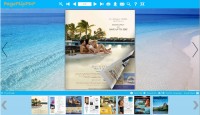
This is Beach theme for page flip book designing is free here. There are four templates packed together and you can learn how to use it with the txt document which is called “how-to-install”. This theme describes a refreshing beach feeling, which makes people associate with wonderful mood and great pleasure. You can use these templates to create beach style flipping page book, summer related digital brochures, fresh style flipping magazines and so on. Just vivid your vision with easily installation and simple design. Then you can own a refreshing page turning book with 3D effects and attract others with its concise layout.
Guide to Install Themes & Template for PageFlip PDF to Flash
To use Themes & Template, you must install PageFlip PDF to Flash first!
Download URL:
PageFlip PDF to Flash:
http://www.pageflippdf.com/pageflip-pdf-to-flash/index.html
1. Run PageFlip PDF to Flash
2. Click File: File->Import Theme, select the *.thm (themes unziped from download zip them package) from open dialog box.
3. Open Template Window by clicking Templates button in Designing setting panel.
4. Find and select the theme you have just imported.
Note:
All various free flash flipbook Themes are available in PageFlip PDF to Flash.
With those Themes & Template you can make more professional and interactive flash Flip Book as you want.
Скачать Beach theme for PageFlip Book Designing бесплатно на странице загрузки.
Beach theme for PageFlip Book Designing 1.0
Основная информация о программе
Разработчик
Рубрика
Лицензия
Версия
Дата релиза
Размер файла
Операционная система
Семейство
Версия ОС
WinVista
Win7 x32
Win7 x64
Windows2000
Windows2003
Требования
Популярность у пользователей
Рейтинг
Голосов
Статистика просмотров
За сегодня
За неделю
За все время
Статистика загрузок
За сегодня
За неделю
За все время
Дополнительная информация
Дата изменения
Ключевые слова
Скачать Beach theme for PageFlip Book Designing 1.0
Pdf to flip
flipping brochure
flip book
Beach templates
pageflip
page flipping
digital magazine
Популярные программы рубрики